.svg)

A Modern Data-AI Platform on Databricks
Discover how migrating to the Databricks Lakehouse architecture unifies your data, AI, and governance while significantly reducing platform costs.


The demands on data platforms have changed fundamentally. Analytics, data engineering, real-time processing, Machine Learning, and Generative AI increasingly need to coexist on a single governed foundation — and organizations that have consolidated onto the Databricks Lakehouse are already seeing the results: significant reductions in total platform spend by replacing always-on warehouse compute with scale-to-zero serverless clusters on Amazon S3 — in one engagement we detail later in this article, an organization achieved a 42% reduction in annual platform costs after migrating to Databricks; unified data governance across all data and AI assets through Unity Catalog, eliminating the security gaps and compliance overhead of managing policies across multiple disconnected systems; faster time-to-production for ML and AI use cases, because data scientists, analytics engineers, and ML engineers all work on the same governed data without copies, reconciliation, or integration overhead; and open, portable data stored in Delta Lake on your own S3 buckets — no proprietary lock-in, no vendor-controlled storage layer, full interoperability with any engine through Delta UniForm.
For organizations still running traditional cloud data warehouses, these outcomes represent a strategic inflection point. The question is no longer "Is our warehouse handling SQL queries well?" but rather "Is our current architecture the right foundation for the next five years of data and AI strategy?"
This is the problem the Databricks Lakehouse was designed to solve. From our experience leading platform modernization initiatives across industries, the organizations that extract the most value are those that treat migration not as a lift-and-shift exercise but as an opportunity to consolidate, simplify, and build a platform that serves analytics and AI equally well.
This article walks through the architectural advantages, the economics, a detailed Databricks migration methodology with a real-world Snowflake-to-Databricks case study, and a phased reference architecture for implementation on AWS.
What is Databricks used for?
Databricks is used as a unified data and AI platform — replacing the patchwork of a data warehouse, a separate Spark environment, a standalone ML platform, and bolt-on streaming and governance tools with a single Lakehouse. Organizations use Databricks for SQL analytics and BI, batch and streaming ETL, Machine Learning and MLOps, Generative AI and AI agents (via Mosaic AI), and end-to-end data governance through Unity Catalog — all on open Delta Lake storage in their own S3 buckets. The result is one copy of governed data serving every workload, from executive dashboards to production AI systems.
Why migrating to the Databricks Lakehouse Architecture Changes the Game
The Problem with Fragmented Data Stacks
Most organizations that have been building data capabilities over the past decade have arrived at a familiar architecture: a cloud data warehouse for BI and reporting, a separate Spark or Python-based environment for data engineering, a standalone ML platform (SageMaker or a self-managed MLflow deployment), a streaming layer bolted on the side (Kafka, Flink), and a growing constellation of point tools for data quality, cataloging, and orchestration.
The result is a fragmented stack where the same data is copied across multiple platforms, data governance processes are duplicated or inconsistent, operational teams spend significant effort keeping everything synchronized, and lineage becomes opaque. The feedback loop between an analytics insight and an ML experiment lengthens from hours to weeks — not because of a technical limitation in any single tool, but because of the integration overhead between all of them.
Migrating to Databricks: One Platform, One Copy of Data
Databricks addresses this fragmentation through the Lakehouse architecture — a model that combines the performance, ACID transactions, and governance expected from a data warehouse with the flexibility, openness, and scalability of a data lake. This is a concrete architectural pattern built on three foundational pillars:
Open storage with Delta Lake. All data sits in Delta Lake (built on Parquet), an open format stored in your own Amazon S3 buckets. There's no proprietary storage layer and no vendor lock-in at the data level. Any engine — Spark, Trino, Flink, DuckDB, or Polars — can read your data natively through Delta UniForm, which provides cross-format compatibility with Apache Iceberg and Apache Hudi. Organizations retain full ownership and portability of their data assets, eliminating the most significant long-term risk in platform selection.
Unified compute for every workload. A single platform handles SQL analytics (via Databricks SQL warehouses with Photon), batch and streaming ETL (via Spark Structured Streaming and Delta Live Tables), Machine Learning (via MLflow, Feature Store, and Model Serving), and Generative AI (via Mosaic AI, Vector Search, and AI Functions) — all operating on the same governed datasets. This eliminates the need for separate platforms and the data copies that come with them.
Built-in data governance with Unity Catalog. Unity Catalog provides a single metastore for all data and AI assets — tables, views, volumes (unstructured data), ML models, registered functions, connections, and AI endpoints. It unifies data governance processes that, in fragmented stacks, are typically scattered across the warehouse, the lake, the ML platform, and the catalog. Fine-grained access control, attribute-based access policies, column-level masking, row-level security, data lineage (including column-level lineage), and comprehensive audit logging are managed from one place, across all workloads. For organizations subject to regulatory requirements (GDPR, HIPAA, SOX, PCI-DSS), this consolidation significantly simplifies compliance posture.
The Economics of the Lakehouse
Beyond architecture, cost is often the catalyst that turns strategic interest into an active platform initiative. The fundamental economic advantage of the Lakehouse comes from how it decouples storage and compute — and the downstream effects that decoupling has on every line item in your data platform budget.
Storage at Commodity Pricing
In a Lakehouse architecture, data resides in Amazon S3 at commodity pricing — for reference, published AWS rates for US East (N. Virginia) are approximately $0.023/GB/month for S3 Standard, with tiering options down to S3 Glacier Instant Retrieval ($0.004/GB/month) or S3 Glacier Deep Archive ($0.00099/GB/month) for infrequently accessed datasets. Actual costs vary by region and volume commitments. There's no proprietary storage markup, and Delta Lake's Time Travel is controlled entirely by your own vacuum and retention policies.
Contrast this with traditional warehouse architectures where analytical databases store data in proprietary, performance-optimized storage layers. Large volumes of historical or infrequently accessed data become comparatively expensive to retain — even when they're only queried a few times per year. On the Lakehouse, retaining five years of historical data for trend analysis, audit compliance, or ML training is an S3 storage-class decision, not a warehouse sizing decision.
Compute That Scales to Zero
Databricks SQL Serverless warehouses spin up in seconds and scale down to zero when idle, meaning you pay only for the queries and transformations that actually execute. For batch workloads, job clusters are created at the start of a pipeline run and terminated upon completion — there's no "always-on" baseline to fund.
Photon, the C++ vectorized execution engine native to Databricks SQL, delivers significant performance improvements on analytical queries. According to Databricks, Photon achieves approximately 2× speedup on the TPC-DS 1TB benchmark over standard Databricks Runtime, while customers have reported 3–8× improvements on real-world workloads depending on query patterns (Databricks Photon Engine; Accelerate Feature Engineering With Photon, Aug 2024). These gains translate directly into lower compute costs per query and faster dashboard load times.
Predictive Optimization takes this further by automatically managing table maintenance operations — OPTIMIZE, VACUUM, and ANALYZE — based on observed query patterns and data characteristics. Instead of teams manually scheduling maintenance windows or over-provisioning to compensate for unoptimized tables, Databricks handles it transparently, reducing both operational overhead and compute waste.
Liquid Clustering: Eliminating Manual Performance Tuning
Traditional approaches to data layout optimization — partitioning strategies, Z-ordering, sort keys — require upfront design decisions that are difficult to change as query patterns evolve. Liquid Clustering replaces this with an adaptive approach: data is automatically reorganized based on clustering keys, incrementally and without full rewrites. As query patterns shift over time, Liquid Clustering adapts — eliminating a class of performance-tuning work that historically consumed significant engineering hours.
Real-world Databricks migration cost outcome: In the Snowflake-to-Databricks migration described later in this article, the organization achieved a 42% reduction in annual platform costs.
Based on our engagement experience, organizations can achieve significant reductions in total platform spend after consolidating onto Databricks — the magnitude depends on workload mix, compute utilization patterns, and the proportion of historical data relative to active analytics. Databricks has published customer case studies reporting similar outcomes, and independent analyses such as Forrester's Total Economic Impact studies provide additional third-party perspectives on Lakehouse economics. More importantly, the freed budget doesn't disappear — it funds the advanced analytics, ML, and Generative AI initiatives that motivated the platform transition in the first place.
The Databricks Migration Lifecycle: Five Workstreams
A well-structured Databricks migration program operates across five parallel workstreams. These are not sequential phases — they overlap and reinforce each other throughout the initiative.
Workstream 1 — Discovery and Assessment.
Before writing a single line of code, teams must build a comprehensive inventory of the existing data estate. This means cataloging every database, schema, table, view, stored procedure, UDF, materialized view, task/schedule, and external integration. Equally important is analyzing query history: which objects are actively used, by whom, how frequently, and with what downstream dependencies.
Many warehouse environments accumulate significant "dark matter" — objects that were created years ago, are no longer actively consumed, but nobody is confident enough to deprecate. A rigorous discovery phase separates the critical migration scope from the objects that can be retired — in our experience, this can reduce the effective migration surface by a significant margin, sometimes eliminating a quarter or more of the cataloged objects.
Databricks' Lakebridge toolkit automates much of this discovery. It scans the source SQL estate — views, stored procedures, UDFs, and query history — to produce a detailed compatibility report. Each object is categorized by migration complexity (auto-convertible, partially convertible, requires manual refactoring), and the overall effort is estimated with enough granularity to support sprint planning and resource allocation.
Workstream 2 — Data Migration and Validation.
When migrating to Databricks, data must move from the source platform's proprietary storage into Delta Lake tables within Unity Catalog. The approach depends on volume, freshness requirements, and whether the source system will continue running in parallel during the transition:
For bulk historical data, the typical pattern is to export from the source warehouse to Amazon S3 (via platform-specific export commands, e.g., COPY INTO in Snowflake or UNLOAD in Redshift), then load into Delta tables using Auto Loader for incremental file detection when new exports continue to arrive in batches, or COPY INTO on the Databricks side for one-time bulk loads. Auto Loader is particularly effective here because it handles incremental file detection, schema inference, and schema evolution automatically — even when the export produces thousands of files across multiple batches.
For ongoing replication during the parallel-run period, Lakeflow Connect provides managed CDC connectors that replicate directly from source databases and SaaS applications into Delta tables. Alternatively, tools like Fivetran or Airbyte can serve this role if they're already part of the organization's toolchain.
Data validation is non-negotiable at this stage. Every migrated table must be reconciled against its source counterpart across multiple dimensions: row counts, schema compatibility (column names, data types, nullability), aggregate checksums (sums, averages, min/max on numeric columns), and sample-based row-level comparison for critical business entities. Lakebridge provides a reconciliation framework for this purpose, but many teams supplement it with custom validation notebooks or dbt tests that run continuously during the parallel period.
Workstream 3 — SQL and Logic Translation.
This is typically the most labor-intensive workstream. The source SQL estate — views, transformations, stored procedures, UDFs, and business logic — must be translated into Databricks-compatible SQL, dbt models, or PySpark code. The complexity varies dramatically by object type:
Standard analytical SQL (SELECT statements, window functions, CTEs, aggregations, JOINs, CASE expressions) typically translates with minimal or no changes. Databricks SQL's ANSI compliance and broad function library mean that a majority of a typical SQL estate works as-is or with trivial syntax adjustments.
Platform-specific functions and idioms require systematic mapping. Semi-structured data handling (e.g., VARIANT types, FLATTEN, colon-path notation) translates to Databricks' STRUCT, MAP, ARRAY, explode(), and from_json() patterns. Temporal functions (DATEADD, DATEDIFF, DATE_TRUNC) are supported natively but may have subtle behavioral differences around timezone handling. Utility functions (TRY_TO_NUMBER, IFF, ZEROIFNULL, OBJECT_CONSTRUCT, PARSE_JSON) map to Databricks equivalents (TRY_CAST, IF/CASE, COALESCE, NAMED_STRUCT, FROM_JSON).
Procedural logic — stored procedures with loops, cursors, exception handling, and dynamic SQL — is where the highest-effort refactoring lives. Databricks supports SQL Scripting for procedural control flow and Python UDFs for complex logic, but in many cases, the migration is an opportunity to decompose monolithic stored procedures into modular, testable dbt models or PySpark functions. This refactoring improves maintainability and opens the door to unit testing, version control, and CI/CD patterns that were difficult or impossible in the source platform.
Lakebridge's automated SQL transpilation handles the auto-convertible portion — which in our engagements has typically covered 60–80% of SQL objects, though results vary by environment complexity — generating Databricks-compatible SQL with function mapping, data type conversion, and syntax normalization. The remaining portion requires experienced engineering judgment — and this is where Databricks migration expertise matters most.
Workstream 4 — Pipeline and Orchestration Re-engineering.
Source platform schedules, tasks, and pipeline definitions need to be rebuilt in Databricks. This workstream is also an opportunity to modernize: many warehouse environments rely on platform-native scheduling (e.g., Snowflake Tasks, stored procedure chains) or external cron-based orchestration with limited observability.
Databricks Workflows provides DAG-based orchestration with multi-task support (SQL, Python, dbt, DLT, notebooks), file arrival triggers, retry policies, and SLA alerting. For organizations with existing Airflow or Dagster investments, both integrate natively via official Databricks operators.
Workstream 5 — Data Governance, Security, and Access Control Migration
Migrating data governance processes is often more nuanced than it appears. Roles, privileges, row-level security policies, column masking rules, and audit requirements from the source platform must be mapped to Unity Catalog. Source platforms may use role-based inheritance hierarchies, future grants, or share-based access patterns that don't map 1:1 to Unity Catalog's attribute-based access model. A careful mapping exercise — documented in a data governance migration matrix — prevents both security gaps and overly restrictive policies that block users post-cutover.
Parallel Run and Cutover Strategy
The safest Databricks migration pattern involves running both platforms in parallel for a defined period (typically 2–6 weeks for each migration wave). During this window, the same transformations execute on both platforms, outputs are continuously compared, and downstream consumers (BI dashboards, reports, operational queries) are gradually redirected to Databricks. This dual-run approach adds infrastructure cost but dramatically reduces risk — it provides a safety net for rollback and builds confidence across both technical and business stakeholders.
Cutover itself should be anti-climactic. If the parallel-run validation has been thorough, the final switch is simply a matter of redirecting connection strings, updating BI tool configurations, and decommissioning source platform compute. Data can remain in the source platform's storage temporarily as a fallback — there's no urgency to delete it until the team is fully confident in the new platform.
Reference Architecture: A Phased Databricks Lakehouse Implementation
The five workstreams described above define how to migrate, and the following reference architecture pattern is what we've recommended across multiple engagements. Below is a generalized view of the target state, applicable regardless of source platform.
Phase 1 — Foundation and Data Landing
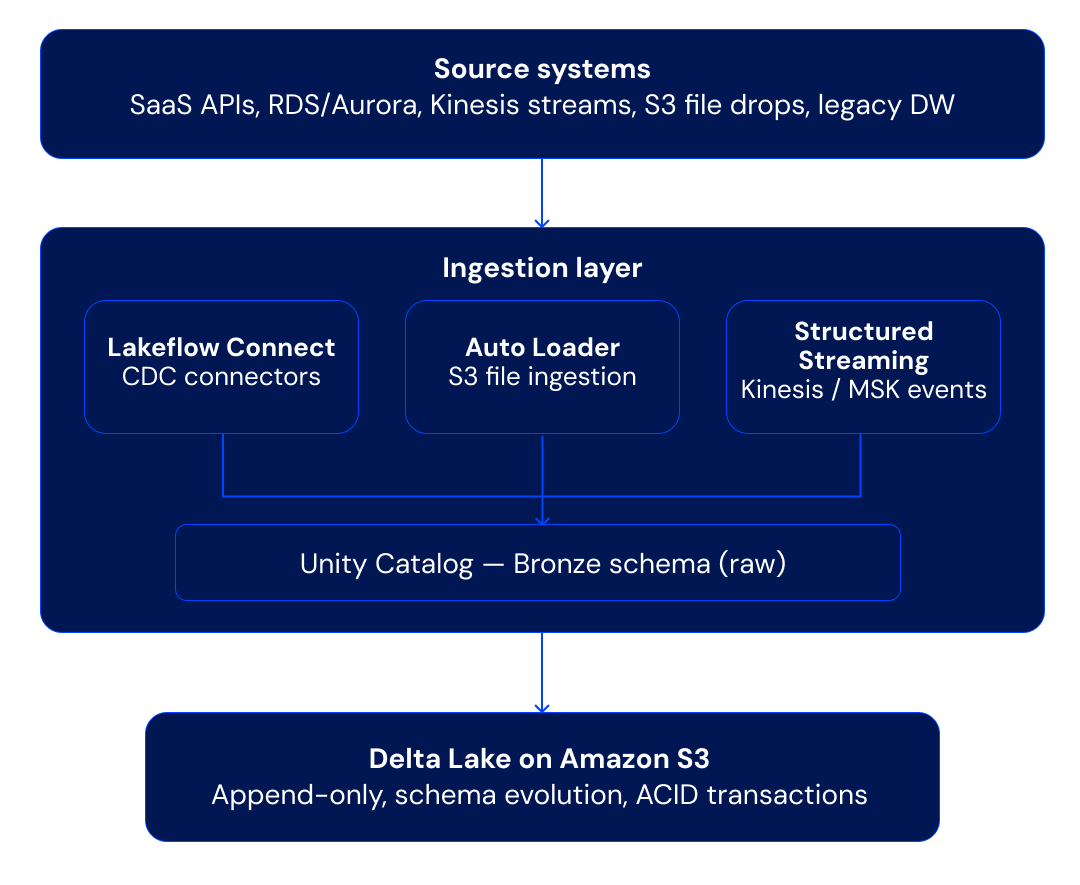
The ingestion layer lands raw data into Bronze tables within Unity Catalog. Auto Loader handles incremental file detection, schema inference, and schema evolution automatically — it's the default choice for landing files from S3 into Delta Lake.
For managed source-system replication, Lakeflow Connect (Databricks' native ingestion service) provides turnkey connectors for databases and SaaS applications, delivering CDC-based replication directly into Delta tables without requiring external ingestion tools. For organizations already using Fivetran or Airbyte, both integrate natively and write directly to Delta Lake. Real-time event streams are consumed via Spark Structured Streaming, writing micro-batches to Delta tables with exactly-once semantics.
Phase 2 — Transformation Layer (Medallion Architecture)
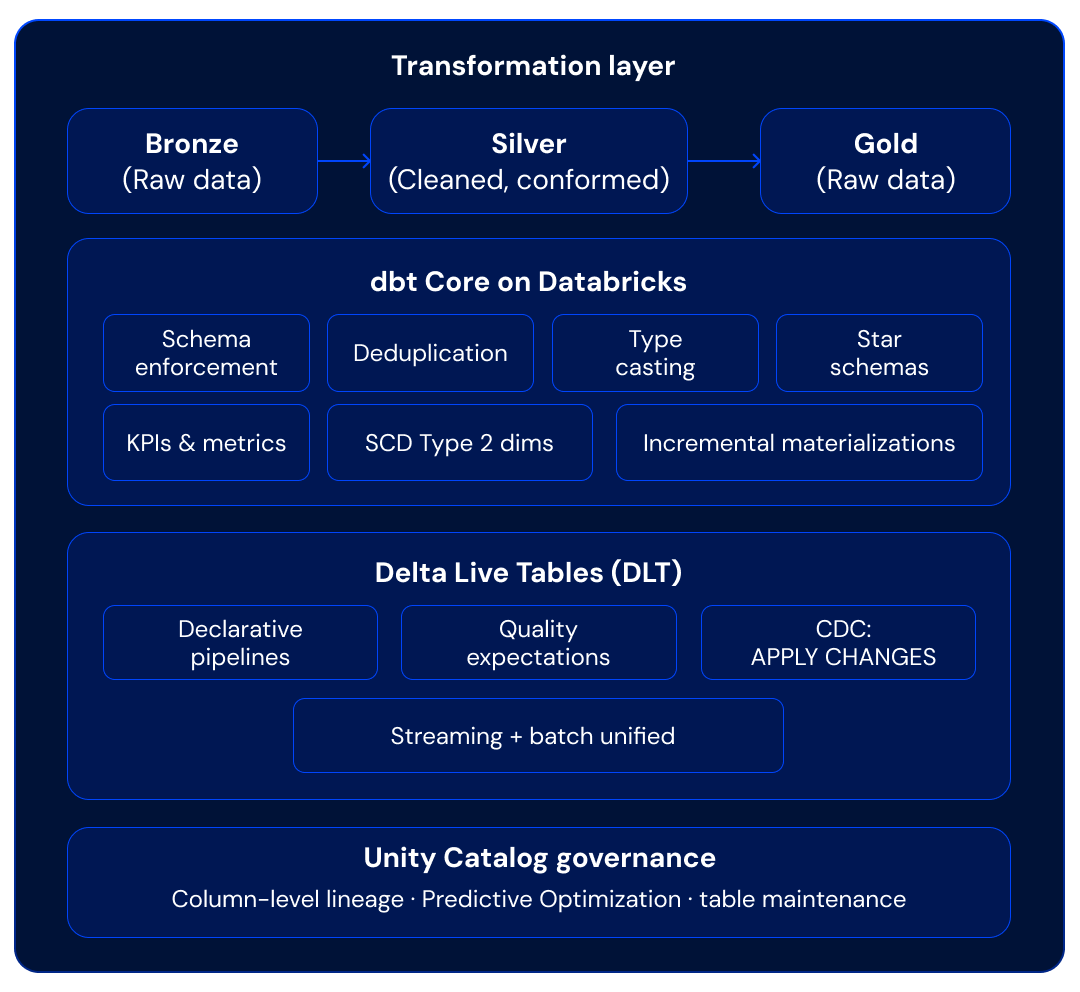
This is where the bulk of migrated SQL logic lands. Existing warehouse views and transformations are refactored into dbt models following the Medallion architecture (Bronze → Silver → Gold). dbt on Databricks executes natively against Databricks SQL warehouses or all-purpose clusters, and the dbt-databricks adapter supports Delta-specific features like OPTIMIZE, ZORDER, Liquid Clustering, and incremental models with merge strategies.
For teams that prefer a more declarative, managed approach, Delta Live Tables (DLT) provides an alternative transformation framework with built-in data quality enforcement through declarative expectations (e.g., CONSTRAINT valid_amount EXPECT (amount > 0) ON VIOLATION DROP ROW). DLT's APPLY CHANGES INTO syntax is particularly powerful for CDC-based ingestion, handling deduplication, ordering, and SCD Type 1/2 patterns declaratively.
In practice, we often see a hybrid: dbt for the core analytical transformation layer (where existing SQL translates most directly) and DLT for streaming ingestion pipelines or data quality-critical flows.
Phase 3 — Serving, Analytics, and AI
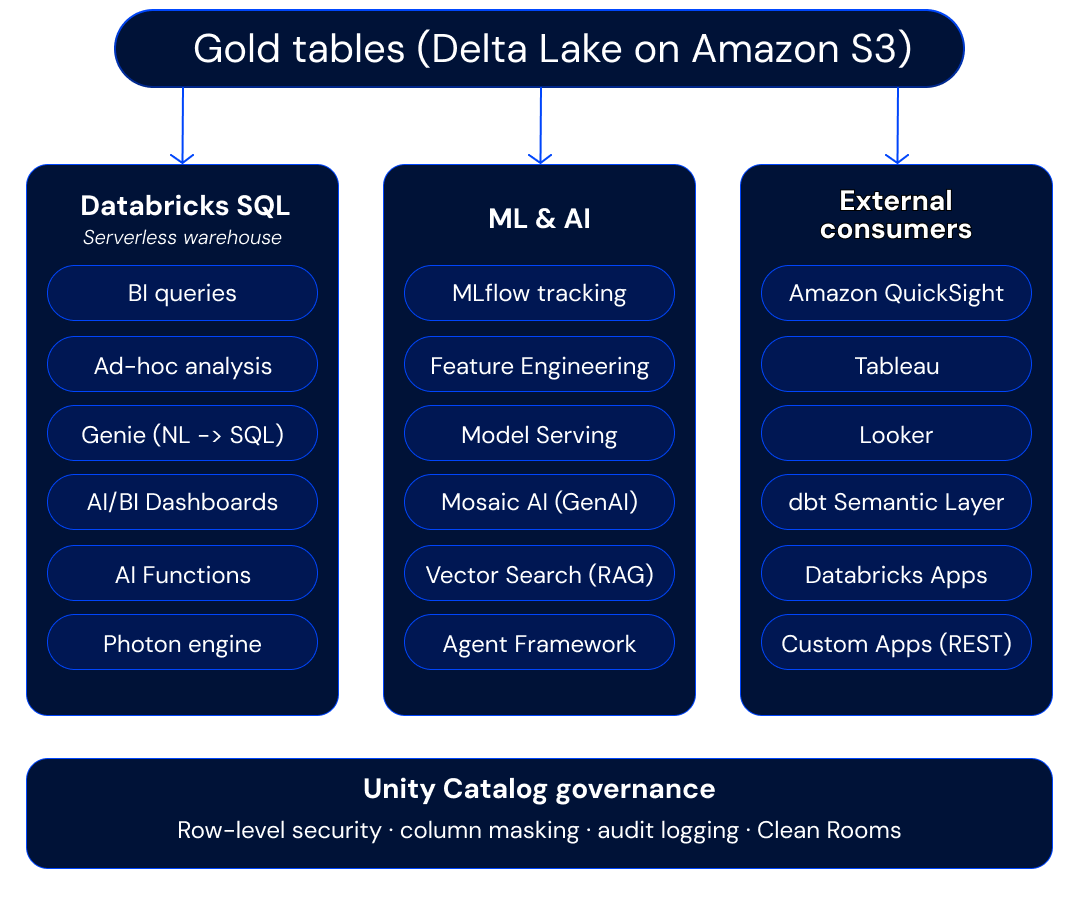
Gold tables serve the analytical and AI layers simultaneously — this is the architectural payoff of the Lakehouse.
Databricks SQL Serverless warehouses provide sub-second query performance for BI tools, with Photon acceleration and intelligent result caching. BI platforms connect via native connectors (Partner Connect for Tableau, Power BI direct integration via Direct Lake mode, Looker via JDBC).
Genie brings natural-language querying to the platform, enabling business users to ask questions of their data in plain English and receive SQL-backed answers — grounded in Unity Catalog metadata and governed by the same access policies. AI/BI Dashboards extend this with AI-powered visualizations that non-technical users can create and share.
AI Functions (ai_query(), ai_generate(), ai_classify(), ai_extract(), ai_summarize()) allow teams to invoke large language models and Gen AI workflows directly within SQL queries and dbt transformations — enriching data pipelines with classification, extraction, summarization, and sentiment analysis without leaving the SQL layer. This is a capability with no equivalent in traditional warehouse architectures.
The same Gold-layer datasets feed ML workflows — feature engineering, experiment tracking via MLflow, model serving for real-time inference, and RAG patterns using Vector Search. Mosaic AI Agent Framework enables teams to build, evaluate, and deploy AI agents — compound AI systems that combine LLMs with tools, retrieval, and enterprise data — all governed by Unity Catalog. The same Gold-layer pattern is what enables advanced activation use cases like a Databricks composable CDP, real-time personalization, and customer 360 — without copying data into a separate activation platform.
Databricks Apps provides a built-in hosting environment for deploying custom Streamlit, Gradio, or Flask applications directly within the Databricks workspace. Teams can build and share data applications — internal tools, customer-facing dashboards, AI-powered interfaces — without managing separate infrastructure, and with automatic Unity Catalog integration for data access governance.
Phase 4 — Orchestration and Observability
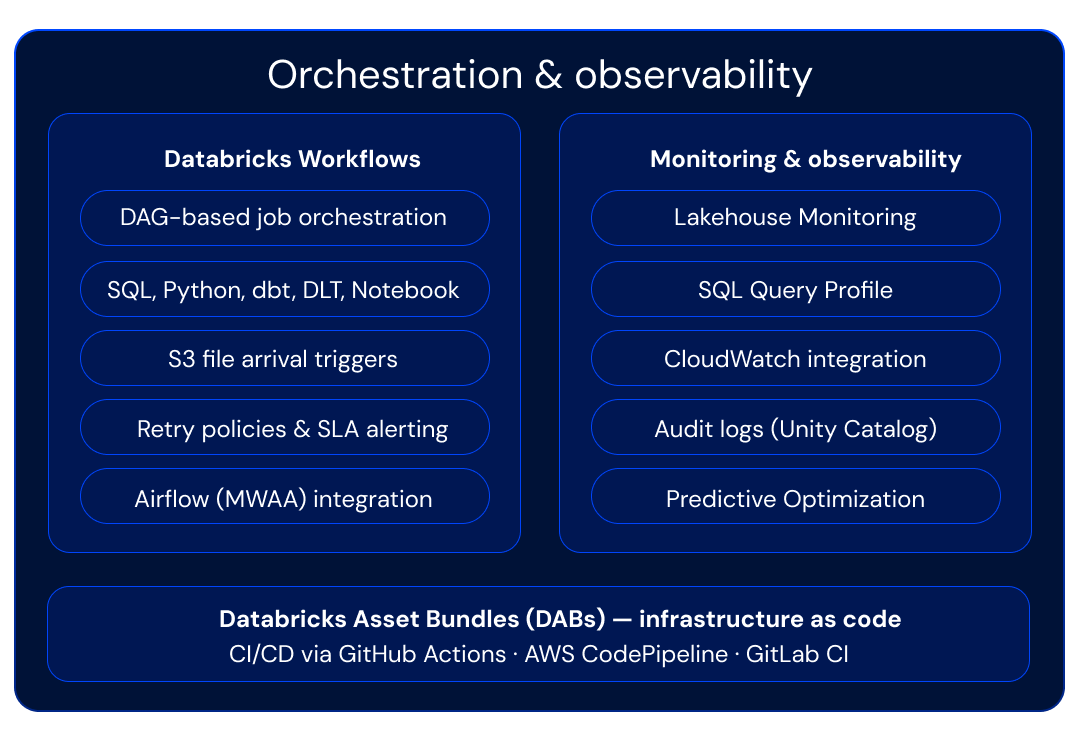
Databricks Workflows provides native orchestration for multi-task pipelines that combine SQL transformations, dbt runs, DLT pipelines, Python scripts, and ML training jobs into a single DAG. File arrival triggers enable event-driven pipelines that start automatically when new data lands in S3. For organizations already invested in Airflow or Dagster, both integrate natively with Databricks via official operators and APIs.
Observability is built into the platform: Lakehouse Monitoring tracks data quality metrics, statistical drift, and anomalies over time across your Delta tables. SQL Query Profile provides detailed execution plans for performance tuning. Unity Catalog's audit logs provide a complete record of who accessed what data and when — a foundational requirement for any modern data governance program. And Predictive Optimization closes the loop by automatically acting on maintenance signals — so observability doesn't just inform, it triggers automated remediation.
Databricks Asset Bundles tie everything together from a deployment perspective, enabling teams to define all platform resources as code and promote them through CI/CD pipelines using GitHub Actions, AWS CodePipeline, or GitLab CI.
Databricks Migration as a Strategic Platform Decision
Migrating to Databricks is not about replacing one SQL engine with another. It's a long-term architectural decision that determines how an organization will manage, govern, and derive value from its data for years to come.
Organizations that approach a Databricks migration successfully share several common traits: they treat migration as a phased transformation rather than a big-bang cutover; they invest in automated SQL conversion (via Lakebridge) while retaining experienced engineers for the edge cases that automation can't handle; they validate rigorously at every stage, comparing outputs between source and target until confidence is established; and they design for the target Databricks Lakehouse architecture rather than replicating warehouse patterns on a new platform.
The Lakehouse model represents a clear strategic direction for organizations that need analytics, data engineering, and AI to operate on a single, governed, open platform. The tooling ecosystem — Lakebridge for migration, Delta Live Tables for pipelines, Unity Catalog for data governance, Mosaic AI for Generative AI and AI agents, and Asset Bundles for deployment — has matured to the point where the migration path is well-defined and well-supported. But the competitive advantage lies not in the tooling alone — it lies in combining automation with experienced, architecture-driven execution that treats migration as the foundation for what comes next.
Frequently Asked Questions
What is Databricks used for? Databricks is used as a unified data and AI platform for SQL analytics, batch and streaming ETL, Machine Learning, Generative AI and AI agents, and end-to-end data governance — all on open Delta Lake storage in cloud object storage like Amazon S3. It replaces the fragmented stack of a separate warehouse, ML platform, streaming layer, and governance tools.
What does a Databricks migration involve?A Databricks migration involves five parallel workstreams: discovery and assessment, data migration and validation, SQL and logic translation, pipeline and orchestration re-engineering, and data governance and access control migration. Most engagements run source and target platforms in parallel for 2–6 weeks per migration wave before cutover.
How much can a Databricks migration reduce platform costs?Cost outcomes depend on workload mix and compute utilization patterns, but in a real Snowflake-to-Databricks migration described in this article, the organization achieved a 42% reduction in annual platform costs. The savings come from scale-to-zero serverless compute, commodity S3 storage, and Photon's query acceleration.
How does Databricks handle data governance?Databricks handles data governance through Unity Catalog, a single metastore covering tables, views, ML models, AI endpoints, and unstructured data. It provides fine-grained access control, attribute-based policies, column-level masking, row-level security, lineage, and audit logging — unifying data governance processes that are typically scattered across warehouses, lakes, ML platforms, and catalogs.
What is the Databricks Lakehouse?The Databricks Lakehouse is an architectural pattern that combines warehouse-grade performance, ACID transactions, and governance with the openness and scalability of a data lake. It's built on three pillars: open storage via Delta Lake, unified compute for SQL, ETL, ML, and Gen AI, and built-in data governance via Unity Catalog.
The patterns and recommendations in this article are based on hands-on delivery experience across multiple data platform modernization engagements. Every migration is unique — if you're evaluating this transition, we'd welcome the opportunity to discuss your specific context and help you build a migration roadmap grounded in your architecture, workloads, and strategic objectives. Do you need Databricks experts or teams of experts? Let's meet!
www.muttdata.ai / email: sales@muttdata.ai
Latest Insights
Why All Our Pilots Are A/B Experiments
.png)
MuttData is now ISO 27001 certified!
What if every Black Friday got smarter?
